For interpreters🗓️ Your Work
Use your Home page and Up next
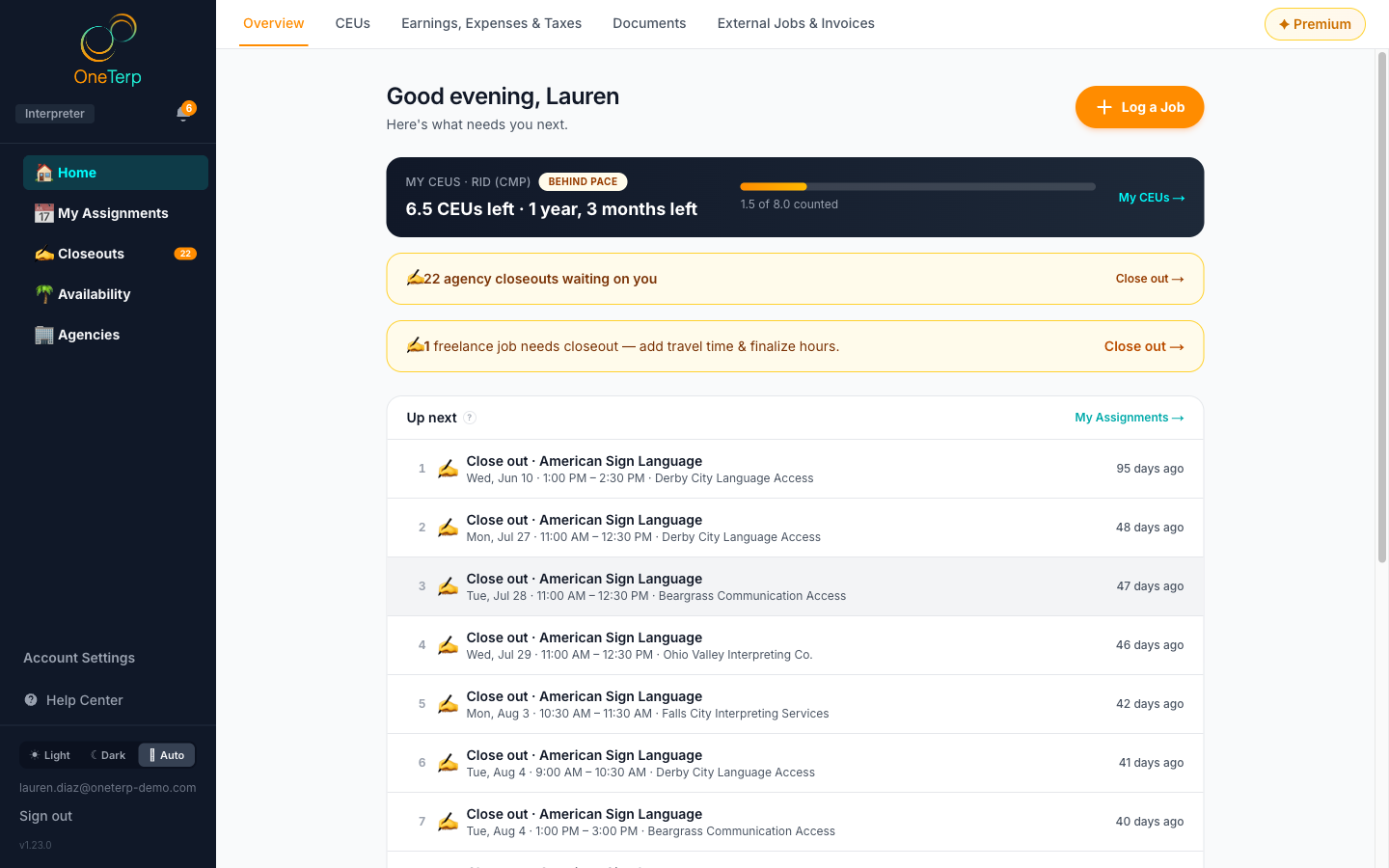
Home is where you land: your CEU countdown, what's waiting on you, and one ranked Up next list of everything coming up, with tabs for the rest of your work.
Home answers "what needs me next?" before "how am I doing?". It opens on the Overview tab, with your CEU countdown at the top and a single numbered Up next list below it, so you don't have to check five pages to find the one thing that matters. The tabs along the top hold the rest of your workspace: CEUs, your earnings, your documents, and, depending on how you work, your freelance jobs or your staff time clock.
Step by step
- 1Click "Home" at the top of the sidebar. You land on the "Overview" tab.
- 2Check the CEU banner at the top. It shows the countdown for your most urgent credential. If you haven't set one up yet, click "Set up your countdown", or "Not now" to hide the prompt for 30 days.
- 3If an amber banner says agency closeouts are waiting on you, click "Close out" to go to your Closeouts page.
- 4Read Up next. It is one numbered list of everything waiting on you, most important first. External jobs you logged yourself are listed with your agency jobs, marked "External". Click any row to go straight to it: an agency job or an offer opens My Assignments, an external job opens External Jobs & Invoices, a closeout opens that job's closeout form, time off opens Availability or your leave requests, and a CEU row opens Find CEUs.
- 5Up next shows ten rows. When there are more, click the "Show all" button at the bottom to see the rest, and "Show fewer" to fold it back.
- 6To look back, click "Show recent agency jobs". Each finished job says "Closed out" or "Needs closeout", and clicking one that needs closeout opens its form. If you use the freelance tools, "Show recent freelance jobs" lists your last five logged jobs.
- 7Use the tabs across the top to move around: "CEUs", "Earnings, Expenses & Taxes", "Documents", and the tabs that fit how you work. The "✦ Premium" pill sits at the far right.
Screenshots
Tips
- How Up next is ordered: anything starting in the next 24 hours comes first, including a job already in progress. Then any job that clashes with your time off, then offers for jobs in the next two days, then the rest of the next three days. After that come closeouts (oldest first), other offers, later assignments, time off in the next two weeks, freelance jobs to close out, CEUs, and last, freelance jobs waiting to be invoiced. Within each group, the soonest comes first.
- A job that overlaps your time off, or a time off request still waiting for approval, shows as an amber "Conflict" row and moves up to just under today's work, however far away it is. Something has to give, so sort it out with the agency.
- A job during hours you marked as regularly unavailable is flagged "outside your usual availability" but keeps its place in the list. It is a heads up, not a clash.
- An offer that falls during your time off says so on its row, and a broadcast offer reads "First to accept gets it".
- Each credential you haven't met yet appears as a "Find workshops" row, ranked by how urgent its deadline is.
- Nothing waiting? Up next tells you you're all caught up.
- Some of Overview only appears if you use the freelance tools: the "Log a Job" button, the note about freelance jobs needing closeout, "Show recent freelance jobs", and the boxes at the bottom for this month's freelance earnings, what's ready to invoice, and this year's tax deductions.
- Which tabs you see depends on how you work. "External Jobs & Invoices" appears when your freelance tools are on. W-2 staff get a "Staff HQ" tab holding Time Clock, Scheduled Shifts and Leave / Time Off. If an agency buys blocks of your time, you get a "Bought Time HQ" tab with your scheduled shifts. The earnings tab is called "Earnings & Reports" if your freelance tools are off.
- The sidebar holds Home, My Assignments, Closeouts, Availability and Agencies. What used to be separate pages are tabs on Home now: "CEUs" (My CEUs and Find CEUs), "Earnings, Expenses & Taxes", "Documents", "External Jobs & Invoices" (the old Freelance HQ) and "Staff HQ" (or "Bought Time HQ"). Old links and bookmarks to them still work.
- If an agency lets you see its schedule and nothing else, your sidebar also has a "Dispatch" row. See the article on viewing your agency's schedule.
- Not subscribed to Premium? A Premium card sits on Overview, just above Up next, with a "Start free trial" (or "Subscribe") button. Click the arrow in its corner to shrink it to one line. It stays small on this device.
Related articles
Still need help?
If this article didn't solve it, submit a ticket and the OneTerp team will follow up.
Submit a ticket