Track your CEUs
See exactly how many CEUs you have left and how long you have, for every credential you renew. Free.
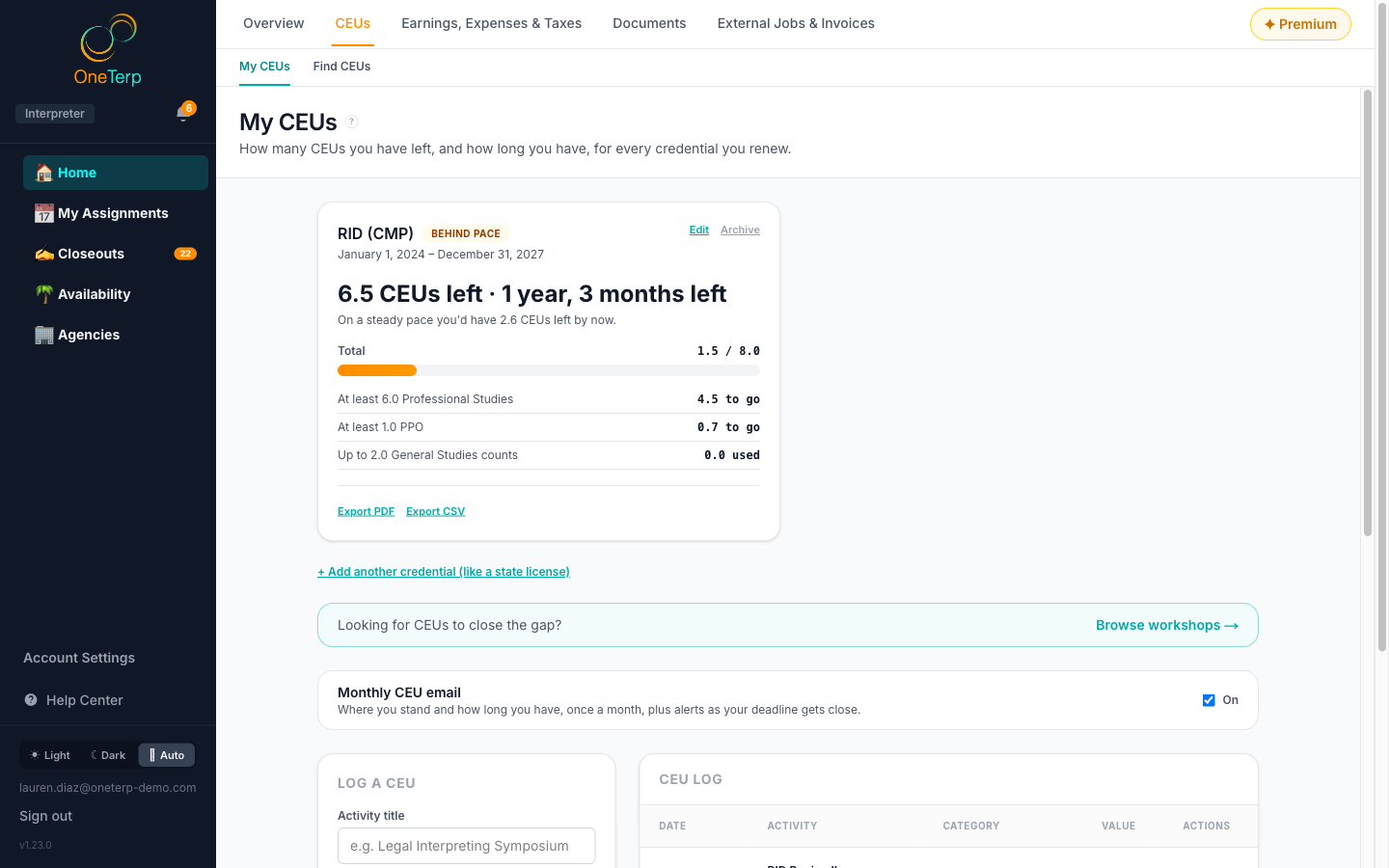
My CEUs gives you a countdown for each credential you renew, and a log of the CEUs you have earned. It is free for every interpreter, staff or freelance, and it lives on the CEUs tab of your Home page. Once a credential is set up, the countdown measures what you log against its requirements. For example, RID is 8.0 CEUs over four years with at least 6.0 Professional Studies including 1.0 PPO, and BEI is 10.0 over five years with 6.0 Interpreting and a separate 2.0 Ethics. Both cap General Studies at 2.0. Every number is yours to change, so confirm your requirements with your certifying body or state board. OneTerp is not affiliated with any of them.
Step by step
- 1Click "Home" in the sidebar, open the "CEUs" tab, then "My CEUs".
- 2The first time, set up your countdown: pick RID, BEI, a state credential, or "Other / my own numbers", check the dates, and press "Start my countdown". The article on setting up a countdown for each credential walks through every choice.
- 3Not ready? "Not now" hides the prompt for 30 days. Until you set one up, the banner at the top of your Home page and a dot on the CEUs tab remind you.
- 4To log a CEU, fill in "Log a CEU": the title, date, value, sponsor and category, and whether it is "Completed (earned)" or "Planned (upcoming)". Then click "Log CEU".
- 5A CEU counts toward every credential whose cycle it falls in. If you hold more than one, the form shows "Counts toward" with a box for each credential; untick any it does not apply to.
- 6If one credential calls the third category PPO and another calls it Ethics, the form asks what the entry "counts as". Leave it on "PPO and Ethics" and it counts as each credential expects.
- 7Use Edit on any entry to fix it, or Delete to remove it.
- 8Still short? Click "Browse workshops" below your countdowns to jump to Find CEUs.
Screenshots
Tips
- Each credential's card shows how many CEUs you have left and how long you have, with a badge: "On track", "Behind pace", "Ending soon", "Requirement met", or "Cycle ended short".
- Behind pace means you have more left than a steady pace from the start of your cycle would leave by now.
- Only entries marked completed count; planned ones are tracked but excluded.
- General Studies is capped, not just optional. Once you pass the cap, the extra stops counting and the card says how much.
- A minimum can't hide behind a full total: if you have 10.0 CEUs but no Ethics yet, you are not done, and the countdown says so.
- Entries outside all of your cycles stay in your log. Use the link above the table to show them.
- Your most urgent credential also leads your Home page, and every credential you haven't met yet has a row in Up next.
- Premium adds a certificate vault ("Attach a certificate" on each entry), "Export PDF" and "Export CSV" on each credential's card to hand to your board, deadline and pace alerts, and workshops matched to your gap. Logging and the countdown are always free.
- If your Premium ends, nothing is deleted. You can still view and remove the certificates you stored; you just can't attach new ones, export, or see matched workshops until you have Premium again.
- Your CEU log and your credentials are private to you. Agencies you work with cannot see them, even one that pays for your Premium.
Related articles
Still need help?
If this article didn't solve it, submit a ticket and the OneTerp team will follow up.
Contact support