For agencies💵 Billing & Payouts
Review and approve interpreter closeouts
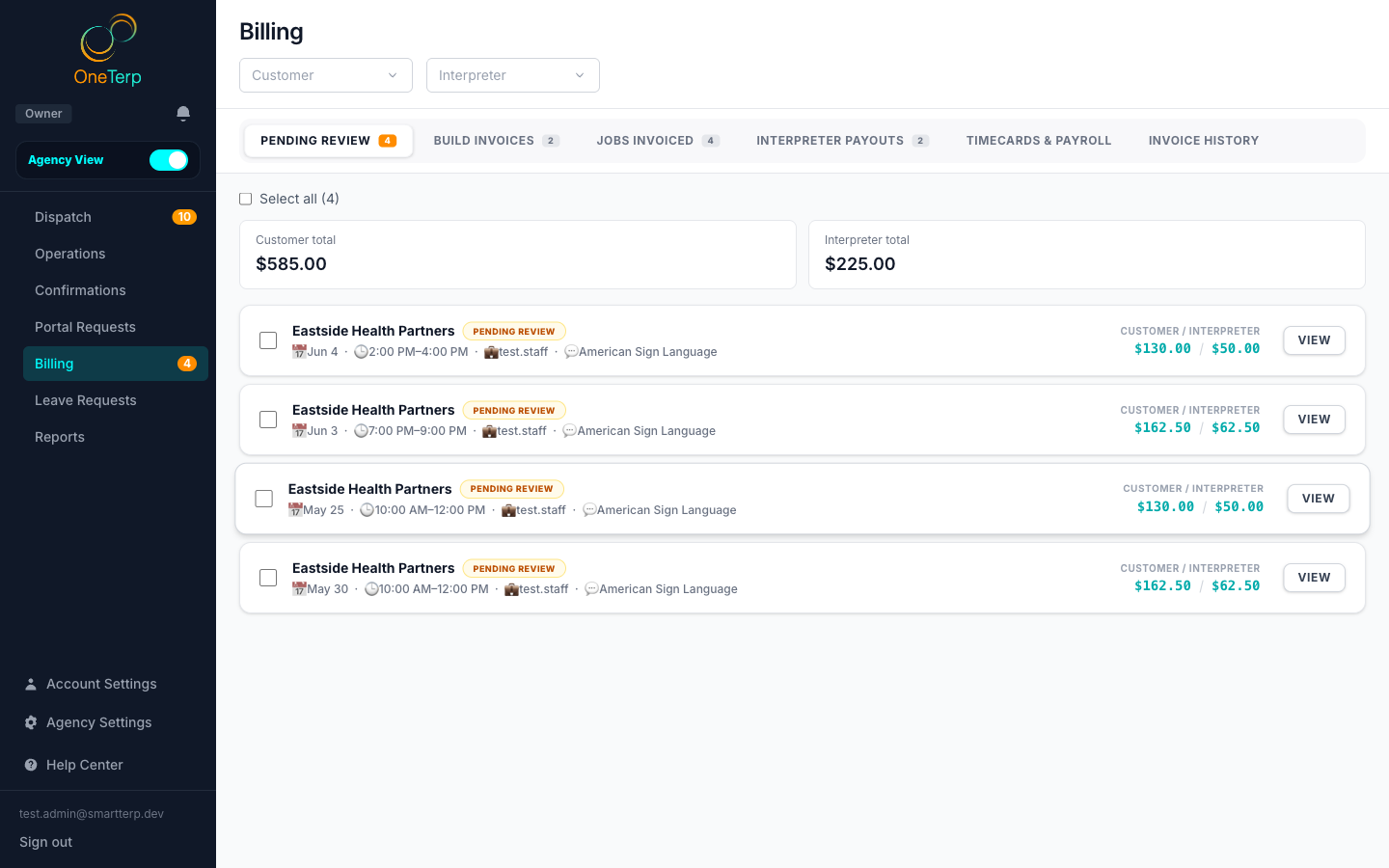
Review each completed assignment, compare what was submitted against what was booked, and approve it for billing and payout.
When an interpreter submits a closeout, the job lands in your Pending Review queue. Approving it locks in the customer charge, advances the job toward invoicing, and unlocks the interpreter payout.
Step by step
- 1Open Billing and go to the Pending Review tab. Its "Ready to review" sub-tab lists completed jobs plus any late cancellations that are still billable, and "Awaiting closeout" lists jobs whose interpreter has not submitted paperwork yet.
- 2Click an assignment to open its billing detail and see the computed customer and interpreter charges broken down by time segment.
- 3Compare the actual times, travel, and expenses the interpreter submitted against the originally booked job. A "Started late" or "Ended early" badge on the row means a closeout was more than 5 minutes off schedule; hover it for the minutes.
- 4Adjust any override fields if a charge needs correcting; leave a field blank to keep the calculated value shown as the placeholder.
- 5Click "Approve this assignment" in the detail panel, or tick several clean jobs and click the "Approve selected" button (it shows how many you ticked) to clear them at once.
- 6Confirm the approved job moves out of Pending Review and into the list of jobs ready to invoice.
Screenshots
Tips
- Approving needs Billing access at the Manage level. Someone with Billing: View can open the queue and read every figure, but cannot approve.
- Late cancellations are billable: scheduled times are charged but travel, mileage, and expenses are automatically zeroed.
- Jobs that cross midnight show a +1 day marker on the spanning segment so the duration reads correctly.
- On a team job with several interpreters, the detail panel shows a "Customer billing" section for each slot, named for its interpreter, then a "Customer total" that adds them up. That total is what the invoice carries.
- If you turn on "Require an on-site verification signature" in Settings, Billing & Subscription, Billing Rules, the detail panel shows the signer's name and signature under "Verification signature".
- When an interpreter ticked "No one was available to sign", the row shows a "Not signed" chip with their reason, and the detail panel shows it under "No verification signature". This is a flag, never a block: you can still approve the job and decide from the reason whether to bill it.
- Closeouts submitted before you turned the signature setting on are not flagged.
- Approving a job stamps the assignment as payout-approved, so even a late-cancel job with no closeout still flows to payouts.
Related articles
Still need help?
If this article didn't solve it, submit a ticket and the OneTerp team will follow up.
Contact support